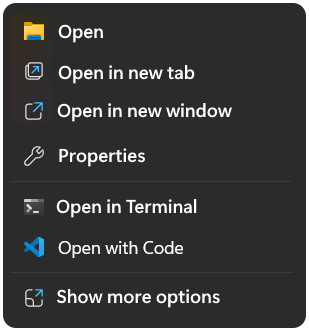
Easily restore the disappered Open with Code context menu item in the Windows explorer context menu.
How To easily restore the disappered Windows context menu “Open with Code” using VS Code, open a command prompt elevated as administrator and run the following lines.
REG ADD "HKCR\VSCodeContextMenu" /v "Title" /t REG_EXPAND_SZ /d "Open with Code" /f
REG ADD "HKCR\VSCodeSourceFile\shell\open\command" /ve /t REG_SZ /d "\"C:\Users\[username]\AppData\Local\Programs\Microsoft VS Code\Code.exe\" \"%%1\"" /f
REG ADD "HKCU\Software\Classes\VSCodeContextMenu" /v "Title" /t REG_EXPAND_SZ /d "Open with Code" /f
REG ADD "HKCU\Software\Classes\VSCodeSourceFile\shell\open\command" /ve /t REG_SZ /d "\"C:\Users\[username]\AppData\Local\Programs\Microsoft VS Code\Code.exe\" \"%%1\"" /f Replace the username placeholder in square brackets with your actual username, without square brackets.
The path to code.exe shown here accordingly vs code is installed from the pre-release channel; otherwise, look under Program Files and replace the path accordingly.
Open with Code Batch file
Another option is to download openwcode.cmd from here, Right-click and save as openwcode.cmd without the .txt extension.
Before you run the batch file, don’t forget to replace the placeholder [username] with your actual username.
Editing the Batch file
You can use the search replace command using sed, to replace your actual windows username.
sed -i "s/\[username\]/%USERNAME%/g" openwcode.cmdThis adds the Windows 11 context menu as well as the common menu without requiring the shift key to be pressed when clicking file or folder.
Getting sed on Windows 11 is easiest with install Git for Windows. Open PowerShell or command prompt and enter the the command:
winget install --id Git.Git -e --source wingetThis command installs the official “Git for Windows” package, which includes Git Bash with necessary tools. Finally, you can run the command.
"%ProgramFiles%\Git\usr\bin\sed.exe" -i "s/\[username\]/%USERNAME%/g" openwcode.cmd